
Get My Eval Test Harness and Run Your First Experiment
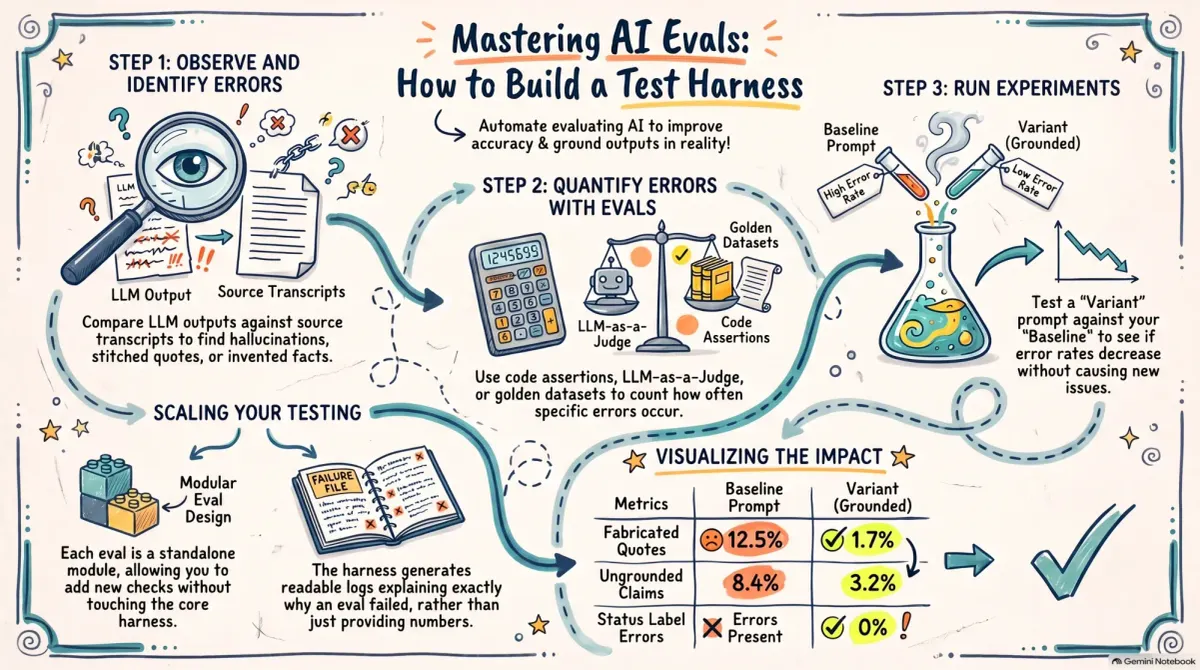
My in-depth AI evals guide explains what evals are and how to build them. This post gives you the tool I use to run them.
Here's the practical problem. To get a baseline, you have to run every input through your prompt, save each output, run every eval against every output, and tally up the results. Then you have to do it all again for each variant you want to test. You can do this by hand, but it gets tedious fast.
For my customer-facing products, I built a simple test harness that does all of this for me. I've cleaned it up and put it in a repo, along with a complete worked example. You can watch the whole loop run on a small example before you swap in your own inputs, prompts, and evals.
The Repo Includes a Worked Example You Can Learn From
Most eval examples are either too abstract to learn from or so tied to a specific product that you can't reuse them. I wanted something in between: a small, made-up product that makes the same kinds of mistakes you'll see in your own work.
Sprout is a made-up houseplant care app. The workflow we're testing takes a customer interview transcript and writes a short story about that person's first month with the app. It also labels the participant's status: still using it, stopped, or undecided. If this sounds familiar, it's because it's the same type of workflow I used to write my Lovable stories. And it makes the same types of mistakes. It makes up quotes, it invents facts, and it gets the wrong answer about where the participant ended up.
The repo includes 15 interview transcripts. They are synthetic, but they include the kinds of messy details that show up in real interviews. In one, the participant's sister is the one paying for the annual plan. In another, it's the roommate who has 20 plants, not the participant. One participant gets all the way to the payment screen and backs out. In another, the interviewer misstates a number and the participant corrects it.
Each of these details is an opportunity for the LLM to get it wrong. If the story attributes the sister's subscription or the roommate's plants to the participant, that's an error. Three of the transcripts were designed specifically to make the status label hard to get right. One participant opens the app every single morning, but she's already decided to cancel at the end of the month. Which status should she get? The baseline prompt picks the wrong one.
Walk Through All Three Steps From the Guide
The README follows the same three steps as the guide. You don't need an API key to follow along. The repo includes a complete run: the outputs from both prompts, the results from every eval, and the comparison between the two. At each step, you can read the results that are already there, or you can run it yourself and generate your own.
- Step 1: Look at what the LLM is doing. Read each story next to the transcript it came from. The README points out the errors you'll find: two separate sentences stitched together into one quote, "within days" when the participant actually said "within like a week," a bookmark feature that was never mentioned in the transcript.
- Step 2: Count how often each error occurs. Each error gets its own eval. You'll find one of each type from the guide.
- A code assertion checks that every quote appears word for word in the transcript (this is the hallucination guard I described in the guide).
- An LLM-as-a-Judge fact-checks each claim against the transcript. The judge comes with a calibration set of 29 hand-labeled claims. Remember, the judge is an LLM too, so we need to check its work.
- A golden dataset eval checks the status label.
- A second code assertion that checks whether the model used the number of quotes the prompt asked for.
- Step 3: Run an experiment. The baseline prompt asks for a vivid story and says nothing about sticking to the transcript. The variant prompt adds explicit rules about staying grounded in the transcript and defines each status label. Fabricated quotes dropped from 12.5% to 1.7%. Ungrounded claims dropped from 8.4% to 3.2%. Status errors dropped to zero. Every error rate went down. That's the check I described in the guide. If a change fixes one error but makes another one worse, it isn't an improvement.
Each step is a single command. And the output isn't just a table of numbers. For every eval, the harness writes a failures file that lists each error it found, written so a person can read it. The summary table tells you whether the variant is better. The failures tell you why. They also tell you whether your eval is measuring what you think it's measuring.
Use the Harness to Run Your Own Evals
The Sprout example is there to help you learn how the harness works. But the harness isn't specific to Sprout. It's designed so that you can swap in your own workflow.
To do that, you need three things: a set of inputs, the prompt or LLM service you want to test, and an eval for each error you want to count.
You'll need to define the inputs as described in the guide. The README shows you where to put them.
The evals work exactly the way I described in the guide. Each eval is a module. The harness doesn't need to understand what your eval does. It hands each output to the module and collects the count. That means you can add a new eval for a new error without touching anything else.
The README walks you through writing your own eval module. It's written for novice coders. The simplest module in the repo is your template, and every line of it is commented.
And you don't have to write the code yourself. Give your favorite model the template, the description of what a module receives and returns, and the error you want to count, and ask it to write the module for you. Just be sure to read what it wrote and try it on a few real outputs before you trust its numbers.
Once your evals are in place, you're ready to run an experiment. Each experiment is a small config file that names your baseline prompt, your variant prompt, and the evals to run against both. Run it and you get an error rate for each eval, for each prompt, side by side. Every number traces back to the output and the judge verdict that produced it, so when something looks off, you can see exactly why.
Now It's Your Turn
This tool is available to Supporting Members and CDH Members. Subscribe to gain access.