My Team of Agents: How I Get Claude to Do Tasks While I'm Away from the Computer
Share this article | Listen to this article ($)
Every morning I wake up and Claude has already added several tasks to my to-do list.
If I have a podcast recording on the calendar, my podcast-manager agent (powered by Claude) prepares a podcast-interview-prep task with a summary of who I'm interviewing and what they are building. It also creates a transcript review document and sets the right share settings. After the recording, it adds a task to my to-do list to share the transcript with the podcast participants.
If I have a sales call, my sales-admin agent (also powered by Claude) will prepare a sales-meeting-prep task for me with notes on who I am meeting with, where they are in the sales process, and anything else I need to know to move the deal forward. After the call, the sales admin creates tasks with all my next steps.
Every week, I get a report added to my Monday to-do list. It's generated by my coding-manager agent (still powered by Claude). It scans through all my coding sessions from the prior week and gives me tips on how I can improve. The tips cover common mistakes or dead-ends that I keep running into and how to fix or avoid them and ways I can work better with Claude. It's my weekly retrospective.
Today, I'm going to walk through how I get Claude to do tasks for me while I'm away from the computer.
I was inspired to build this system because of the growth and popularity of OpenClaw. OpenClaw is an open-source agent harness that allows you to set up personalized agents that work on your behalf. But it has some downsides.
When OpenClaw first came out, it required careful configuration to use safely. People enamored with the promise of a personalized agent gave it broad access to their machines (browser, terminal, files, credentials), installed third-party skills, and ran up large usage bills.
After hearing one too many horror stories about hours wasted and surprise bills, I wanted a safer way to explore the advantages of OpenClaw while also managing the costs. That's what inspired my agent setup.
If you are new to my Claude Code series, I've covered a lot of ground.
- Claude Code: What It Is, How It's Different, And Why Non-Technical People Should Use It
- Stop Repeating Yourself: Give Claude Code a Memory
- How to Use Claude Code Safely: A Non-Technical Guide to Managing Risk
- How to Choose Which Tasks to Automate with AI (+50 Real Examples)
- How to Build AI Workflows with Claude Code (Even If You're Not Technical)
- How to Use Claude Code: A Guide to Slash Commands, Agents, Skills, and Plugins
- Context Rot: Why AI Gets Worse the Longer You Chat (And How to Fix It)
- How to Share Your AI Context and Skills Across Devices
I have not received any compensation from Anthropic for writing this series. And you can trust that if that ever changes, I will disclose it. This is not only required by the FTC here in the US, I strongly believe it is the right thing to do. You can count on me to do so.
An Overview of How My Agent Team Works
Watch this overview video and then dive into the details below.
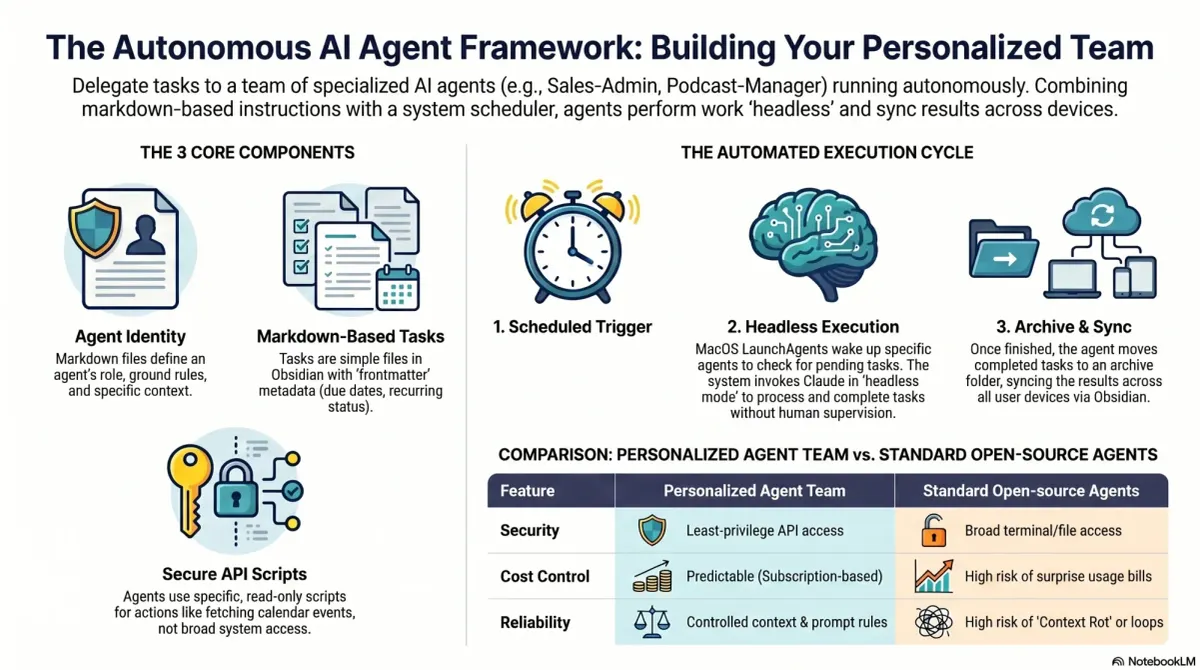
I currently have three agents who work for me: a podcast manager, a sales admin, and a coding manager. I suspect my team will grow as I have more time to invest in this strategy.
This system works based on four key components:
- Agent identity - a markdown file that tells the agent who it is, where its task folder lives, and provides context for the types of tasks it will do.
- Scheduler - I'm using MacOS's built-in scheduler (via LaunchAgents). This is like cron, but runs with all your user permissions on Mac. That means I can run all of this under my Claude Code Max subscription or my ChatGPT/Codex subscription.
- Tasks - each agent has a folder of tasks. A task is a markdown file with frontmatter.
- Scripts - each agent has its own scripts folder that includes utilities that it can either run (as needed) or that run on a schedule.
Agent identity, tasks, and scripts are saved in Obsidian—not Claude Code skills or agents. The scheduler runs on my always-on Mac Mini. The benefit of this is it just works across all of my devices and I can seamlessly switch between Claude Code, Codex—or any other coding CLI—as I need to. All it takes is updating my script that the scheduler uses.
In the rest of this article, I'll walk through each of these four components in detail. And you'll get step-by-step instructions for how to set this up yourself.
Product Talk is a reader-supported publication. The rest of this article is for paid subscribers. If you haven't already, subscribe to get full access.